Throttle Builder
Throttle Builder is where you build your store's website without code: the home page, shop and product templates, content pages, cart and account pages, the header and footer, menus and the announcement bar. You can build in the visual editor, or connect an AI agent such as Claude, Cursor or VS Code and let it build for you within the access you give it. Your products, cart and checkout stay in Throttle.
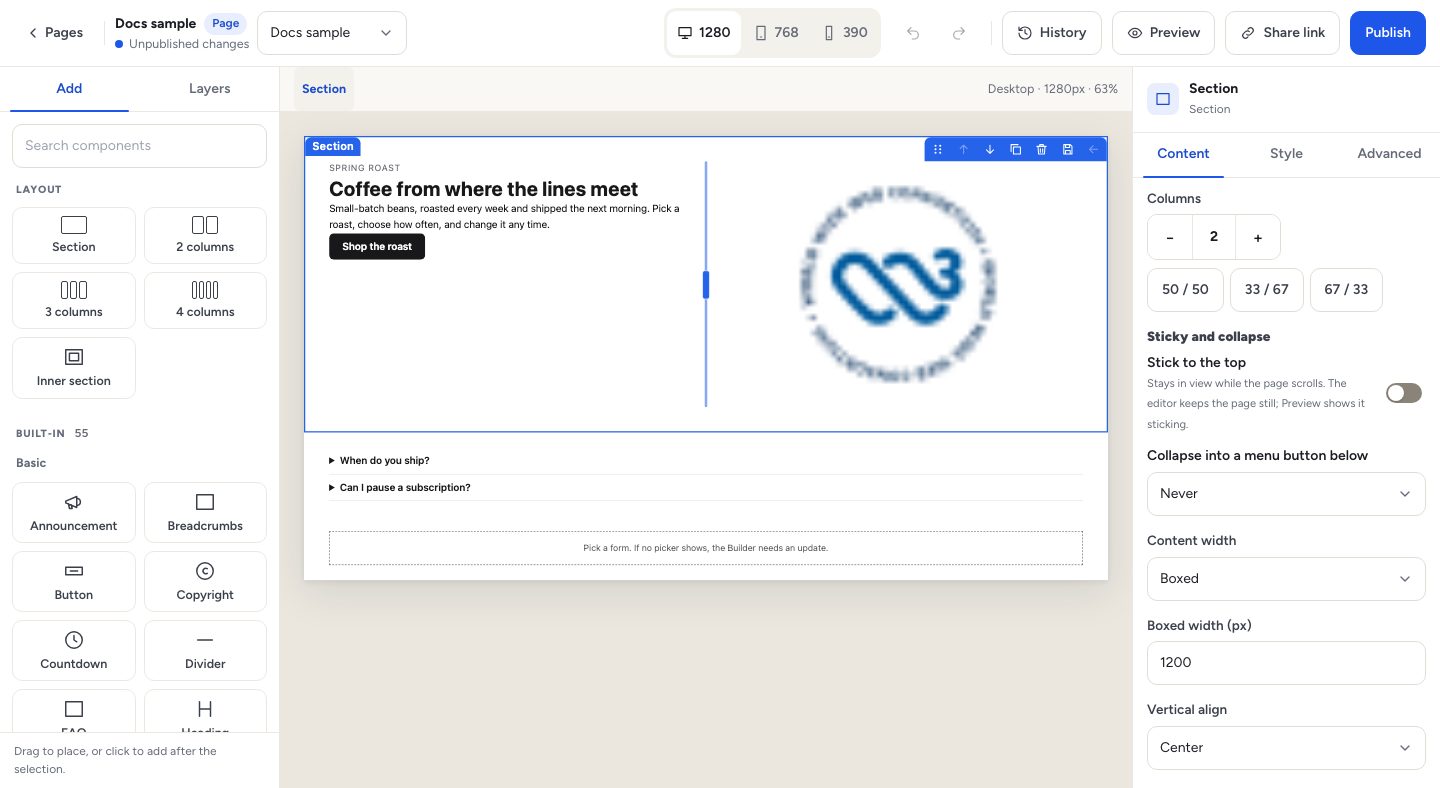
Where things live
Throttle Builder opens from your installed extensions in the Throttle dashboard. Its left menu has three groups:
| Group | Place | What you do there |
|---|---|---|
| Build | Pages & templates | Create and edit pages and the shop, cart and account templates, and the header and footer. |
| Build | Components | The component library: built-in components, your custom code components and saved sections. |
| Build | Site | Store-wide settings: theme, custom CSS, brand, menus, announcement, search and sharing, wording, delivery and shop display. |
| Connect | Keys & AI agents | Keys for your store and for AI agents, with their access level, and setup for each AI tool. |
| Connect | Connections | Link Product Catalog and set your store address. |
| Connect | Store webhooks | Tell your store when you publish, so changes show at once. |
| Library | Media | Your images: upload them. |
How a page is built
A page is a stack of sections. A section has one to six columns, and a column holds components: headings, images, buttons, product grids, forms and more (67 are built in). A column can also hold an inner section with its own columns. A section can turn its columns into tabs, an accordion, a carousel or a show-and-hide toggle. Every setting can differ on desktop, tablet and phone.
Everything you change is a draft until you publish. Every change is kept in history, so you can undo it or restore an older version.
The guide
Getting started
Install the Builder, connect your store, make a first page and publish it.
Open guidePages and templates
Content pages, shop templates, cart, account and the 404 page.
Open guideSections and layout
Sections, columns, inner sections, responsive overrides and interactions.
Open guideComponents
Every built-in component with every option, its default and allowed values.
Open guideSaved and code components
Reuse sections, and build your own components with HTML, CSS and JavaScript.
Open guideMenus and mega menu
Header, footer and mobile menus with three levels and a mega menu.
Open guideHeader and footer
The header and footer are Builder parts you design like a page.
Open guideSite settings
Store-wide design, brand, announcement, search and sharing, wording and more.
Open guideMedia
Upload images, add them from a URL, and use them anywhere in the store.
Open guidePublishing and history
Drafts, preview, publish, history, undo and restoring an older version.
Open guideContact forms
Contact forms that save submissions in Throttle and email the store owner.
Open guideConnect and AI agents
Keys, access levels and setup for Claude, Cursor and VS Code.
Open guideDevelopers
The Builder packages, the components package without the Builder, and create-store.
Open guideTroubleshooting
Fixes for connection, AI agent, publishing and display problems.
Open guideFor developers
If you build the store's code, start with Developers and the Builder developer reference.