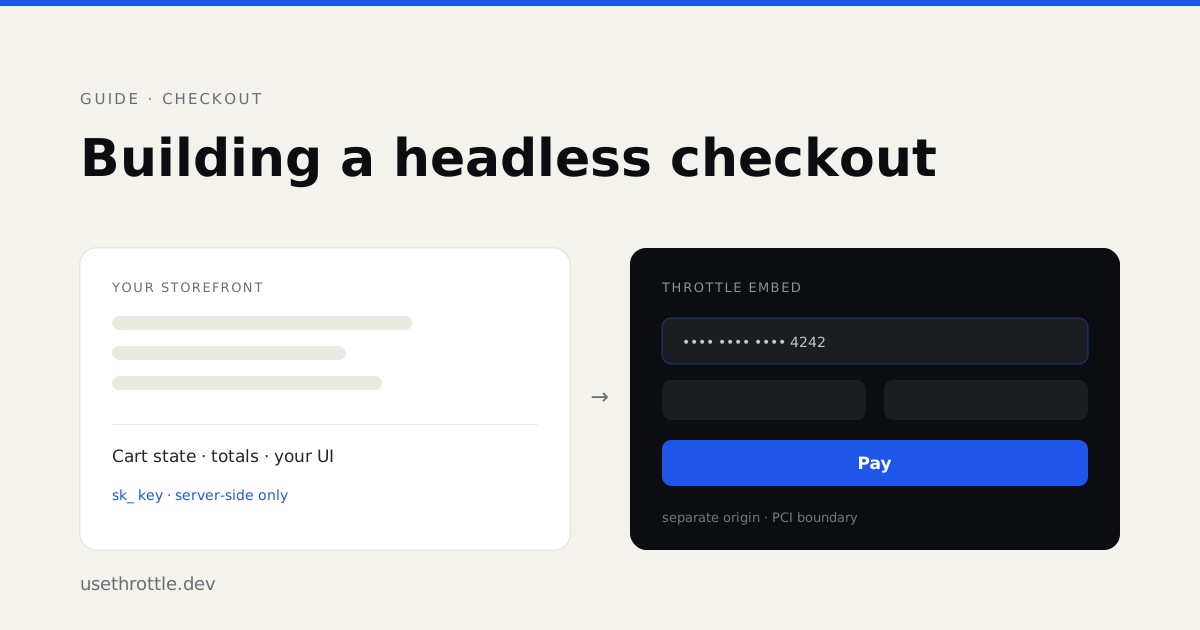
Building a Headless Checkout with Throttle
How a Throttle checkout splits between your storefront and ours: cart state on your server, payment capture in a hardened embed, webhooks as the record.
Headless checkout gets sold as “you own everything.” That’s not quite the deal, and the difference matters before you write any code.
You own the storefront, the cart UI, the routing, and the framework. Throttle owns cart state, totals, orders, and — deliberately — the moment a card number is entered. That last one is not a limitation we’re working around. It is the reason you can ship a checkout without your application landing in PCI scope.
This guide walks the whole path: cart, shipping, session, embed, webhooks.
Who owns what
| Your code | Throttle |
|---|---|
| Product data, catalog, PDP, cart UI | Cart state, line items, totals |
| Framework, routing, styling | Discounts, shipping rates, tax lines |
| Calling the API from your backend | Payment capture, order creation |
| Reacting to webhooks | The PCI boundary |
The one rule that shapes the rest: your secret key never reaches the browser. Cart mutations, session creation, and order reads are all backend calls. The browser gets a session ID and renders an embed.
Before you start
Three values, all from the dashboard, all required before the first call succeeds:
- Application ID — App Settings → General. Without it,
POST /cartsreturnsmissing_application_id. - An allowed origin — App Settings → Allowed origins. Scheme + host + optional port, no paths. Production takes exact origins only; a non-production environment also accepts one leading wildcard under a domain you own (
https://*.preview.example.com) for preview deployments. Without it the embed renders Embed not authorized.http://localhostandhttp://127.0.0.1are always accepted for local work. - A secret key — API Keys. Keys are minted into one workspace environment and carry it in the prefix:
sk_uat_*for a non-production environment,sk_live_*for production.
Every new application is wired to a sandbox payment sub-account at signup, so a non-production session renders a working Card Simulator immediately. You do not need to connect a real processor to build the entire flow end to end.
Step 1 — Build the cart on your server
The cart is a server-side document. Create it, then mutate it.
import { CartClient } from '@usethrottle/cart';

const client = new CartClient({ apiKey: process.env.THROTTLE_API_KEY! });

const cart = await client.carts.create({
  applicationId: process.env.THROTTLE_APPLICATION_ID!,
  currency: 'USD', // optional — inherits the application currency
});

await client.items.add(cart.id, {
  type: 'product',
  name: 'Premium Widget',
  unitPrice: 2599, // minor units, always
  quantity: 1,
  referenceId: 'SKU-1041', // your catalog's ID — Throttle stores no products
});

await client.discounts.apply(cart.id, 'SAVE10');
Two things worth internalising here.
Prices are minor units. 2599 is $25.99. There are no floats anywhere in the money path.
referenceId is your join key. Throttle has no product table — line items arrive from your catalog and are stored on the cart and the order. referenceId is how you get back to your own record later, and it flows through to fulfillment and reporting. Populate it from day one; backfilling it after you have orders is miserable.
Step 2 — Shipping and tax are one call
Selecting a shipping method returns the entire recalculated cart. There’s no calculate-then-recalculate dance.
const cart = await client.shipping.select(cartId, {
  methodId: 'standard',
  displayName: 'Standard (3–5 days)',
  rateAmount: 799,
});

cart.shippingTotal; // 799
cart.taxTotal;      // recomputed
cart.total;         // recomputed
Bind your order summary directly to the returned cart. The single most common bug in a new integration is keeping a parallel copy of the shipping rate or tax total in client state and watching it drift out of sync with the authoritative cart.
Addresses use one canonical shape. addressLine1, city, and countryCode (ISO-3166-1 alpha-2) are required. Send line1, state, country, or zip and you get a validation_error naming the correct field — deliberately loud, because the older behaviour stored the mismatch silently and failed much later at checkout.
Step 3 — Mint a checkout session
There are two session shapes, and picking the wrong one is a common early detour.
Cart-backed session — Throttle renders the full checkout: line items, address form, method picker, payment.
import { createCheckoutClient } from '@usethrottle/checkout-sdk/server';

const checkout = createCheckoutClient({ apiKey: process.env.THROTTLE_API_KEY! });

const session = await checkout.createSession({
  applicationId: process.env.THROTTLE_APPLICATION_ID!,
  cartId: cart.id,
  allowedMethods: ['card', 'net30'],
  returnUrl: 'https://shop.example.com/checkout/success',
  cancelUrl: 'https://shop.example.com/cart',
});

session.sessionId;
session.hostedUrl; // full-page checkout
session.embedUrl;  // iframe-ready
Payment-only embed token — you’ve already built the address and review steps yourself, and you want Throttle to handle nothing but the card.
const { embedToken, sessionId } = await checkout.createEmbedToken({
  applicationId: process.env.THROTTLE_APPLICATION_ID!,
  amount: 2599,
  currency: 'USD',
});
Note that the payment-only endpoint doesn’t accept allowedMethods — the payment widget renders whatever methods your connection has configured. allowedMethods only filters the full hosted checkout.
If you’ve connected an external cart provider such as BigCommerce, pass externalCartId instead of cartId. Sending externalCartId on a native application returns 400 invalid_mode.
Step 4 — Render the embed
In React:
import { PaymentEmbed } from '@usethrottle/checkout-react';

<PaymentEmbed
  sessionId={sessionId}
  parentOrigin="https://shop.example.com"
  baseUrl="https://checkout.usethrottle.dev"
  primary="#1D56E8"
  onSucceeded={({ orderId }) => router.push(`/thank-you?order=${orderId}`)}
  onFailed={({ code, message }) => showPaymentError(code, message)}
/>;
Anywhere else, mount the iframe yourself and listen for the event envelope:
<iframe
  src="https://checkout.usethrottle.dev/c/SESSION_ID?embed=1&mode=payment-only&parentOrigin=https%3A%2F%2Fshop.example.com"
  style="width:100%;height:520px;border:0"
  allow="payment *"
></iframe>

<script>
  window.addEventListener('message', (event) => {
    if (event.origin !== 'https://checkout.usethrottle.dev') return;
    if (event.data?.source !== 'throttle' || event.data?.version !== 1) return;
    if (event.data.type === 'throttle.completed') {
      window.location.href = '/thank-you?order=' + event.data.orderId;
    }
  });
</script>
Check event.origin before you trust anything. Any page can post a message into your window; the origin check is what makes the envelope meaningful.
The embed re-mints its own short-lived JWT on every render, so a buyer who wanders off and comes back ten minutes later doesn’t hit a dead session.
Why payment capture lives in an iframe
This is the part worth understanding rather than working around.
Card details are entered inside a payment widget served from Throttle’s origin, not yours. Your JavaScript cannot read those fields — the browser’s same-origin policy is doing the enforcement, not a promise in our documentation. The card data goes from the buyer’s browser to the processor without transiting your servers, your logs, or your error tracker.
That boundary is what keeps your application out of PCI scope. If your frontend could touch the card number, you would inherit the compliance burden that comes with it, and no amount of “we handle PCI” copy would change that.
So: your checkout is fully headless in every sense that affects your architecture — your routing, your components, your design system, your data. One iframe, roughly 500 pixels tall, is where that stops. It’s a good trade.
Step 5 — Webhooks are the source of truth
The onSucceeded callback tells your UI where to navigate. It does not tell your backend that an order exists. A buyer can close the tab between payment capture and callback; a network can drop. Fulfillment must key off the webhook.
import { createHmac, timingSafeEqual } from 'node:crypto';

// Header: "t=<unix_seconds>,v1=<hex>"
function verify(header: string, rawBody: string, secret: string): boolean {
  const parts = Object.fromEntries(
    header.split(',').map((kv) => kv.split('=') as [string, string]),
  );
  const expected = createHmac('sha256', secret)
    .update(`${parts.t}.${rawBody}`)
    .digest('hex');
  const a = Buffer.from(expected);
  const b = Buffer.from(parts.v1 ?? '');
  return a.length === b.length && timingSafeEqual(a, b);
}
Verify against the raw body. If your framework parsed the JSON before you got to it, the bytes have already changed and the signature will never match.
The events most integrations start with:
order.created— the durable record exists; begin fulfillmentpayment.captured— funds capturedpayment.refunded— reverse whateverorder.createdtriggeredfulfillment.shipment.shipped— tracking is availablecart.abandoned— carries the full cart, including the buyer’s email when you captured onesubscription.renewed— a recurring charge succeeded
Webhook endpoints are scoped to a workspace environment. A non-production endpoint never receives production events, which means you can point a sandbox endpoint at a local tunnel and leave it there.
Mistakes we see most
- Shipping the secret key to the browser.
sk_keys are backend-only. If you need the storefront to estimate totals, use a publishable quote token — it can price a cart but cannot mutate one or create an order. - Treating
onSucceededas fulfillment. It’s a navigation hint.order.createdis the fact. - Skipping
Idempotency-Keyon retries. Send one on any POST you might retry. Reusing a key with a different body is rejected rather than silently applied. - Shadow-copying totals. Read them off the cart every time.
- Forgetting the allowed origin in production. It works locally because localhost is always permitted, then the embed refuses to render on your real domain.
Where to go next
The Cart API reference covers discounts, tax lines, and cart events in depth. Embedded checkout documents every postMessage event and the three completion payload shapes. Workspace environments explains how keys, provider credentials, and webhook endpoints stay isolated between sandbox and production.
If you want the shortest possible path to a working payment first, the quickstart gets you there in five steps.